Found you via Google Ads · "best plumber near me"
Found you via Organic Search · "emergency electrician"
Found you via Facebook Ads
↑ This is a simulated dashboard. Real leads appear just like this, with a name attached, not a session ID.
This is the actual difference
Not a mockup: this is what a GA4 report looks like next to what your client actually wants to see.
Sarah Mitchell
submitted your contact form
Google Ads
“roof repair near me”
James Cooper
clicked your phone number
Organic Search
(Google)
“One link. Zero doubt.”
source / medium: google / cpc
campaign: spring_2024_roofing
sessions: 847
conversions: ???
“So... did my $2,000 in ads get me anything?”
Built to answer a different question
GA4 is a free, general-purpose analytics platform built to measure behavior across huge sites and apps. Lead Recorder is a focused tool for one question: who actually enquired, and where did they come from. GA4 was never built to answer that cleanly; Lead Recorder was built for nothing else.
That gap is common, not rare: even on sites running our own tracking, 19% of leads still show up as “Direct,” with no referrer and no UTM data at all. Without any lead-source tracking, that figure is 100%. Part of the reason is what GA4 is actually built on: cookies and third-party session data that ages out and that browsers increasingly restrict. Lead Recorder captures first-party data straight from your own site, so it's yours to keep, not borrowed from a platform that can change the rules. What first-party actually means, explained.
There's a second, quieter gap on top of that: GA4's “data-driven” attribution model needs real volume before it actually turns on, roughly 400 conversions for a key event and 20,000 total. Most single location businesses never clear that, and GA4 doesn't warn you when it falls back to last-click underneath the same label. Check whether yours qualifies.
Pick GA4 if you need
- Sitewide behavioral analytics across web and app
- Ecommerce revenue and funnel reporting at scale
- BigQuery export and custom audiences
- Org-wide reporting across many properties
Pick Lead Recorder if you need
- To know the name behind a form fill or a call click
- The actual keyword, not "(not provided)"
- Lead history that doesn't disappear after 2 months
- A report a client understands with zero training
This month's sources
47 total leadsSee exactly which channel is driving leads, no digging through reports.
“Free” still means a setup project
GA4 doesn't track leads out of the box. You have to define what a lead even is, tag it as a conversion, and wait for the data to show up. Lead Recorder skips all of that: it already knows a form fill is a lead.
- 1.Create a GA4 property and data stream
- 2.Configure custom events for form submits and phone clicks
- 3.Mark those events as conversions, verify with Tag Assistant
- 4.Wait 24-48 hours for data to start populating reports
- 5.Build an Exploration to see anything beyond source/medium
“Wait, which report shows me who actually filled out the form?”
- 1.Paste one script tag in your site header
- 2.Done. Named leads start appearing in your feed immediately
“Two minutes, and I can already see who converted.”
Side by side, line by line
GA4 is a much bigger platform than this table shows — we're only comparing the lead-tracking slice both tools touch.
← Swipe to see the GA4 column →
GA4 behavior checked against Google's own documentation as of September 10, 2026. Google changes GA4 fairly often — confirm current details at support.google.com, and email us if anything here is out of date.
What you'd actually be looking at
No Explorations to build, no report to configure first. This is the feed as it looks the day you install it.
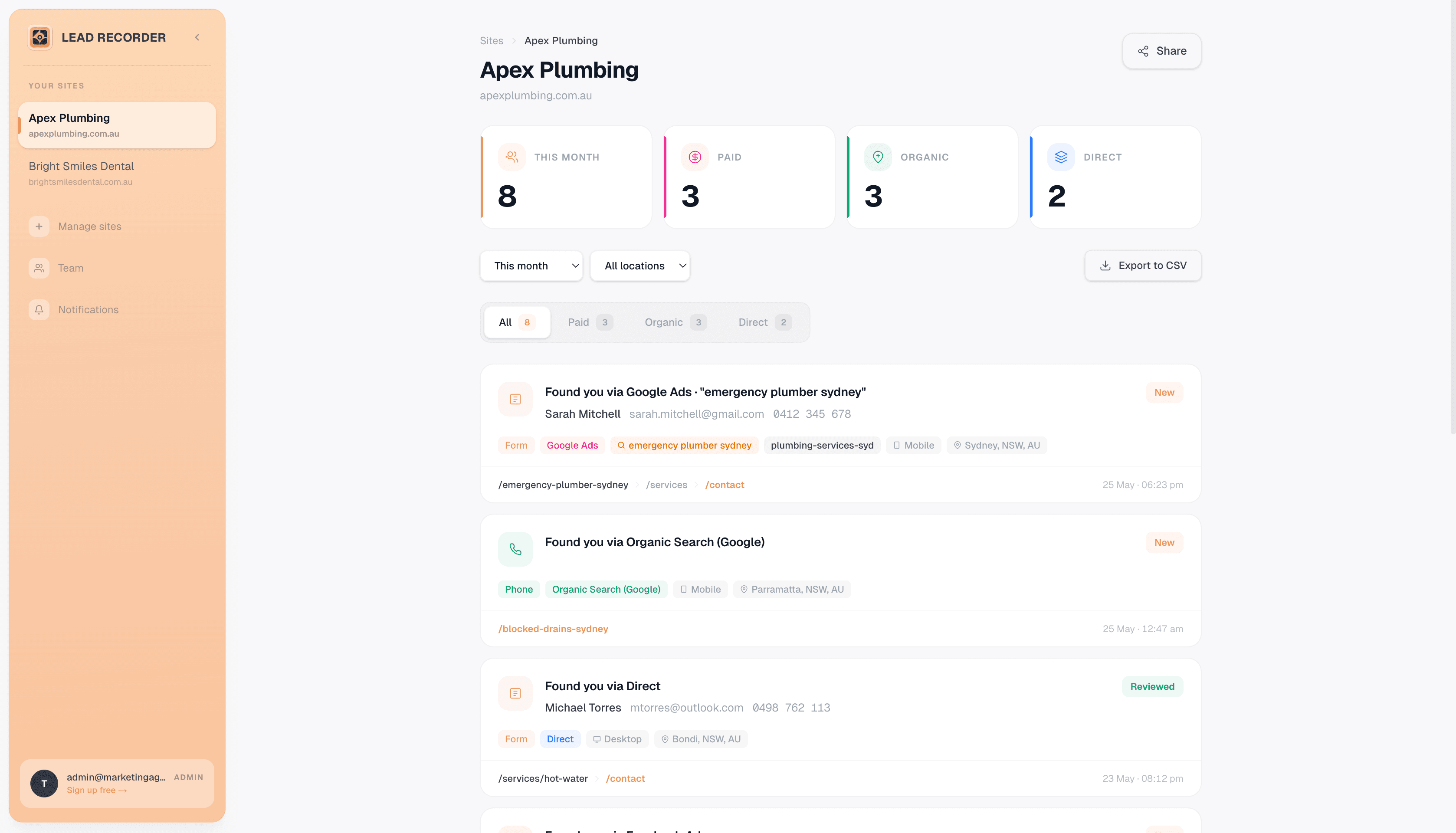
Every lead in one feed, tagged with the source that brought it.
Thirty seconds, start to finish
From an anonymous GA4 session to the exact ad, keyword, and channel that closed it.
Not just a marketing page
This is the exact tool we run on our own client sites, alongside our own GA4 properties.
“I run SEO Growth, a Sydney agency managing 130+ client campaigns. I can watch leads come in live and see exactly what page, ad, or search brought them there.”

Free doesn't mean
simple, or permanent.
GA4 costs nothing in dollars, but it costs setup time, training time, and eventually your history — event data ages out after 2-14 months by default. Lead Recorder is also free to start, and it keeps every lead for as long as your account exists.
Lead Recorder
$39 Business · $99 Studio · $299 Agency. Unlimited lead history on every plan.
GA4
Free on a standard property — but event data retention defaults to 2 months, capped at 14 months unless you're on paid GA4 360.
How long your lead history sticks around
months of historyBoth are free to start. Only one of them still has your data next year.
GA4's event and user data retention defaults to 2 months and can be extended to a maximum of 14 months on a standard property — after that window, the underlying event data is gone, even though the property itself stays free (support.google.com/analytics/answer/7667196). Longer retention is only available on paid GA4 360. Lead Recorder keeps every lead for as long as your account is active, on every plan including the free one.
You don't have to choose
Most people don't rip out GA4 — they keep it for the big picture and add Lead Recorder for the leads GA4 can't name.
Keep GA4 running exactly as it is
No need to touch your GA4 property, conversion events, or reports. Lead Recorder installs independently alongside it.
Add the Lead Recorder script tag
Paste it into your site header next to your GA4 tag. Leads start appearing with names and sources attached, immediately.
Use each tool for what it's good at
GA4 for sitewide behavior and traffic trends. Lead Recorder for knowing exactly who converted and where they came from.
Common questions
Straight answers, including where GA4 is the better fit.
Is Lead Recorder a full replacement for GA4?
No, and it isn't trying to be. GA4 is still the standard for sitewide behavioral analytics, ecommerce funnels, app measurement, and BigQuery export. Lead Recorder does one narrower job: showing you the actual person who submitted a form or clicked to call, and exactly which ad, keyword, or channel brought them. Most of our users keep GA4 running for the big picture and use Lead Recorder for the leads GA4 can't name.
Is GA4's 'data-driven attribution' actually data-driven for a business like mine?
Usually not. GA4 needs roughly 400 conversions for a given key event, and 20,000 total conversions in the lookback window, before data-driven attribution turns on for that event. Below that, it quietly falls back to last-click and doesn't put a warning on the report. A plumbing company doing 40 leads a month would need about ten months just to qualify for one key event. So the report labelled data-driven is, in practice, last-click for most local service businesses. Lead Recorder shows the actual source on every lead regardless of volume, because it isn't modelling anything: it reads where the click came from at the time it happened.
Why does so much of my GA4 traffic show up as (not set) or (direct)?
GA4 puts a session there when it can't classify it: session_start fired without attribution data, the visitor declined consent, or a redirect stripped the tracking parameters off the URL before the page loaded. A growing share of that bucket is also AI search referrals (ChatGPT, Perplexity, and similar) that GA4 has no channel grouping for yet, so they land in (direct) alongside everyone else GA4 couldn't identify. Lead Recorder captures the referrer and landing page directly from your own site at the moment of the visit, so it isn't waiting on a channel definition to catch up.
Why don't I see organic search keywords in GA4?
GA4 doesn't have a keyword dimension for organic search at all. Google dropped it when GA4 replaced Universal Analytics. Linking Google Search Console to GA4 recovers some keyword data, but it sits in a separate report that can't be joined to individual conversions or leads. Lead Recorder shows the search term against the specific lead it brought you.
Does GA4 really delete my data?
Yes. GA4's event and user data retention defaults to 2 months and tops out at 14 months on a standard (free) property; after that window, the underlying event-level data is gone, even though your reports and property stay active. Longer retention requires the paid GA4 360 product. Lead Recorder keeps your full lead history for as long as your account is active, on every plan.
Is Lead Recorder free, like GA4?
No, not anymore, but the pricing is still simple: plans start at $39/mo flat, with no usage fees on top. GA4 is free because Google monetises your traffic data elsewhere; Lead Recorder is a paid tool built specifically to show you who enquired, not to feed an ad platform.
How accurate is this comparison?
GA4's retention limits, organic keyword behavior, and data-driven attribution thresholds are documented directly by Google's own analytics help centre and checked as of September 10, 2026. Google's product changes fairly often, so if something here looks out of date, email us and we'll fix it.
More questions? Email us and we'll reply within a few hours.
Or book a 30-minute walkthrough with Tom if you'd rather talk it through.
See who's actually
behind your leads.
One script tag. No credit card to start, no GA4 account required.
No credit card required · Cancel anytime
Found you via Google Ads · "best plumber near me"
Found you via Organic Search · "emergency electrician"
Found you via Facebook Ads