Found you via Google Ads · "best plumber near me"
Found you via Organic Search · "emergency electrician"
Found you via Facebook Ads
↑ This is a simulated dashboard. Real leads appear just like this: no number pools to configure first.
Different tool, different job
CallRail is a call tracking platform, first and foremost: dynamic number insertion, recording, and AI conversation intelligence are the core product. Lead Recorder is a focused attribution tool built around form and click leads, with a real phone call tracking add-on for anyone who also wants calls logged, without CallRail's number-pool setup or per-minute pricing.
That question matters more than it should be this hard to answer: in our own tracked data, 19% of leads still show up as “Direct,” unattributed, even with tracking installed. Without any tracking at all, that figure is 100%. Lead Recorder is built to close that specific gap, nothing more.
Pick CallRail if you need
- Dynamic number insertion, call recording and transcription
- AI conversation intelligence (summaries, sentiment, coaching)
- Native integrations with Salesforce, HubSpot, Google Ads
- Deep multi-touch attribution across many campaigns
Pick Lead Recorder if you need
- To know which ad, keyword, or channel drove each lead
- Setup in minutes, no number-pool decisions
- A flat price, no per-minute or per-number charges
- A simple link clients can check without a dashboard login
This month's sources
47 total leadsSee exactly which channel is driving leads, no digging through reports.
Dynamic number pools look different in practice
CallRail's call tracking needs a number pool decision before you've seen a single lead. Lead Recorder skips that step entirely because it isn't tracking calls, just where the click came from.
- 1.Add the tracking script (manual, GTM, or platform plugin)
- 2.Decide on a dynamic number insertion pool size
- 3.Swap the static phone numbers on your site for CallRail tracking numbers
- 4.Connect form tracking, routing rules, and any integrations you need
“How many numbers do we actually need in the pool?”
- 1.Paste one script tag in your site header
- 2.Done. Leads start appearing in your feed
“Two minutes, and I'm already seeing leads.”
Where we overlap, where we don't
CallRail does a lot more than this table shows: call tracking is genuinely its whole product. This is the honest slice that's actually comparable.
← Swipe to see the CallRail column →
CallRail features and pricing checked against their publicly listed pricing as of September 10, 2026. Their pricing can change and custom agency rates aren't publicly listed, so confirm current details at callrail.com, and email us if anything here is out of date.
Real product, real screens
Not a redesigned mockup for this page; these are straight from a live account.
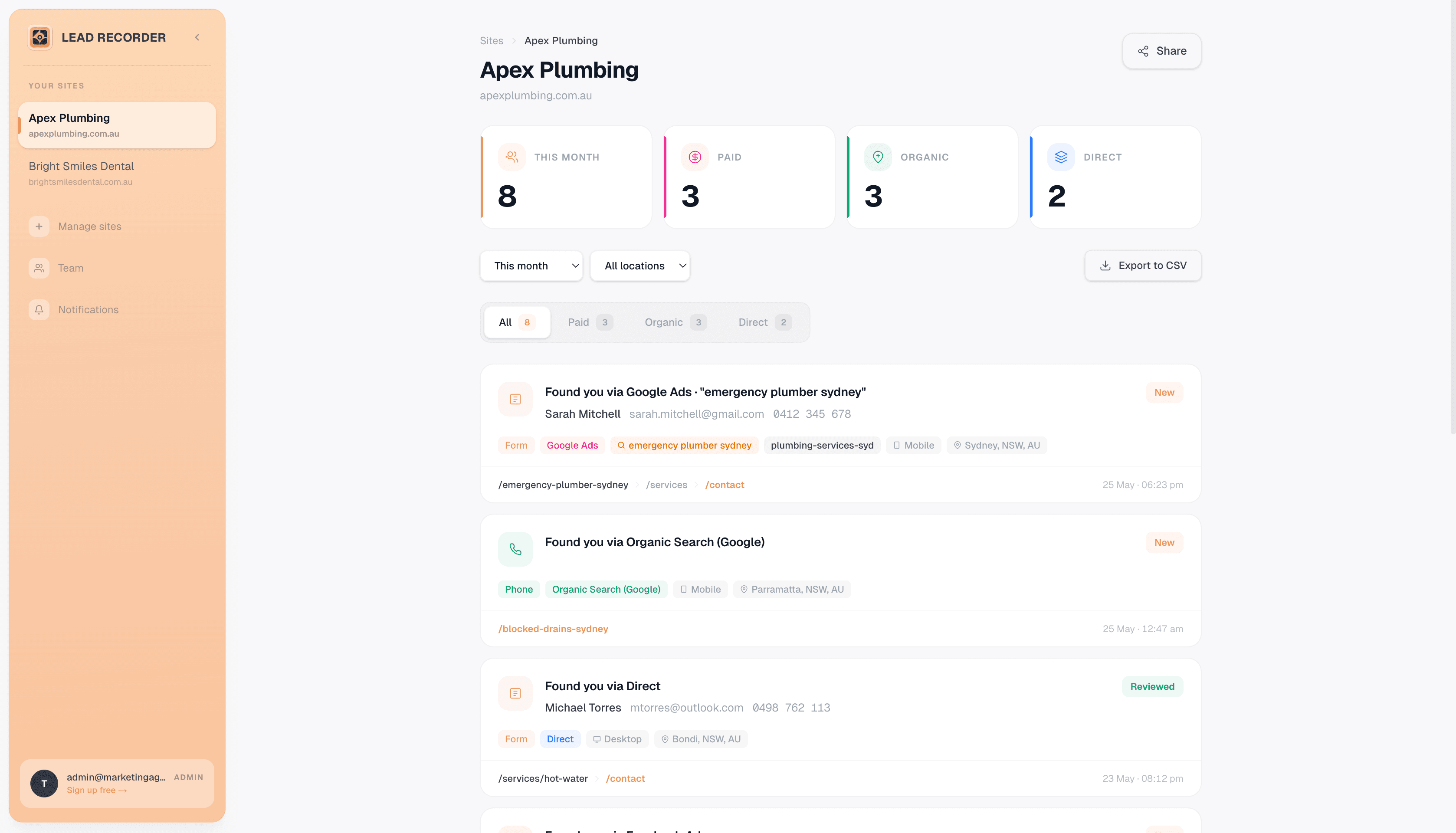
Every lead in one feed, tagged with the source that brought it.
Watch the whole thing in 30 seconds
From an anonymous GA4 session to the exact ad, keyword, and channel that closed it.
This runs on our own client sites
We're not writing about a tool we've never used on real traffic; we track our own agency clients with it daily.
“I run SEO Growth, a Sydney agency managing 130+ client campaigns. I can watch leads come in live and see exactly what page, ad, or search brought them there.”

One flat price.
No usage bill at the end of the month.
The 250 included minutes don't move: they're the same on the $50 plan and the $195 plan. That's roughly two to three tracked calls a day, and calls round up to the whole minute, so a 65-second call bills as two. Spam calls, wrong numbers, and hang-ups all draw down the same allowance, with no refund. Lead Recorder plans include unlimited leads at every paid tier: the price you see is the price you pay.
Lead Recorder
$39 Business · $99 Studio · $299 Agency (up to 25 sites, unlimited leads). No usage fees.
CallRail
$50-$195/mo per account, 250 minutes and 5 numbers included on every tier, then per-minute and per-number overage on top. A single business on Lead Tracking Complete ($95) with 6 numbers and 900 tracked minutes lands closer to $153/mo once transcription and overage are added.
Single business, Lead Tracking Complete
per month6 numbers, 300 calls averaging 3 billable minutes, transcription on. Only one of these numbers is the whole bill.
Worked from CallRail's own published rates as of September 10, 2026: 1 extra number at $3, 650 minutes over the 250 allowance at 6¢, and 650 transcription minutes over at 2.5¢, with the 1,000-submission form allowance covering all 120 forms at no extra cost. That's $153/mo against a $95 sticker. CallRail's pricing page lists both 5¢ and 6¢ per-minute rates depending on the annual/monthly toggle; this uses the monthly rate.
Run your own numbers
See what CallRail's per-minute overage actually adds up to at your call volume, next to a flat Lead Recorder plan.
Your Lead Recorder plan
At this volume the two land within $28.00 of each other
Estimate only. CallRail's Lead Tracking plan is $50/mo billed monthly, with 250 local minutes and 5 numbers included, then 6¢ per additional local minute on the monthly rate (their pricing page also lists 5¢ for annual billing, their published rates as of September 2026). Lead Recorder's call tracking add-on is a flat $29/mo with 150 minutes included and no per-minute overage, so this compares CallRail's metered pricing against a flat fee, not two metered plans. Your actual CallRail bill also depends on extra numbers, toll-free minutes, transcription, and any form-tracking or conversation-intelligence tier upgrade, none of which are included here.
Try it without touching your CallRail setup
Nothing about your number pool or call routing has to change to see what Lead Recorder shows you.
Drop the script tag in next to CallRail's
One line in your site header. It doesn't touch your CallRail tracking numbers or call routing at all.
Watch a week of the same traffic
Same visitors, same leads, two dashboards. See whether the source and keyword attribution lines up.
Decide what to keep
Some teams keep CallRail for the calls and use Lead Recorder for everything else. Others downgrade CallRail once they see form and click attribution was the part they actually needed.
Common questions
Straight answers, including where CallRail is the better fit.
Is Lead Recorder a full replacement for CallRail?
Not if you need dynamic number insertion, call recording, or AI conversation intelligence; CallRail is purpose-built for that. Lead Recorder's core job is showing you which marketing source (Google Ads, SEO keyword, social, referral) drove each form submission or phone-number click, with a simpler call tracking add-on (real number, forwarding, logged as a lead) for anyone who also wants calls captured. If that combination covers what you need, Lead Recorder does it with a lot less setup and no usage-based fees.
Do you offer a free trial?
Not in the CallRail sense of 14 days and then a paywall. There's a 14-day money-back guarantee instead: pick a plan, run it on real traffic, and if it's not right, email us and we'll refund you. The bigger difference is pricing shape, not trial length. CallRail meters by the minute and by the number; Lead Recorder is one flat monthly fee regardless of usage.
Does Lead Recorder track phone leads at all?
Two ways. Every plan detects when a visitor clicks a phone number on your site and attributes that click to its source, at no extra cost. There's also a call tracking add-on ($29/mo, 2 numbers and 150 minutes included) that gives you a real phone number, forwards it to your business, and logs every call as a lead: caller, duration, and whether it connected. We don't do dynamic number insertion, call recording, transcription, or sentiment analysis; if you need to know what was actually said on a call, or want a number that automatically changes per visitor, CallRail is the right tool.
Can agencies use Lead Recorder for multiple clients?
Yes. The Agency plan is $299/mo flat for up to 25 client sites with white-label branding and shareable client links included, no per-account pricing. CallRail bills per account, so tracking five client sites means five separate base subscriptions plus each one's own overage.
Why do all four CallRail plans include the same 250 minutes?
We don't know their reasoning, only the effect: the $50 plan and the $195 plan both include exactly 250 local minutes and 5 numbers. Paying more buys you features (form tracking, AI conversation intelligence), not more headroom before overage kicks in. 250 minutes works out to roughly two or three tracked calls a day, and calls round up to the next full minute, so it fills up faster than it sounds.
Do spam calls and wrong numbers count against the minute allowance?
Yes. Every answered, missed, and failed call draws down the same 250-minute allowance, and CallRail doesn't refund minutes for spam or misdialed calls. To be fair, that's fairly standard for usage-metered call tracking, not unique to CallRail, but it's worth knowing before you size a plan around your expected call volume.
How accurate is this comparison?
We checked CallRail's pricing and plan structure against their publicly listed pricing as of September 10, 2026. Pricing pages change and CallRail negotiates custom rates for larger agencies, so if something here looks off or out of date, email us and we'll fix it. It's always worth confirming current numbers at callrail.com before you decide.
More questions? Email us and we'll reply within a few hours.
Or book a 30-minute walkthrough with Tom if you'd rather talk it through.
Skip the number pool.
Just see the source.
One script tag. No credit card to start, no per-minute bill.
No credit card required · Cancel anytime